 Phinsh
Text Collage Maker: Fill Any Word or Name With Photos
Text collage maker for photos inside letters: type a word, name, initials or year, add your photos and Phinsh fills the letters. Fonts, settings, print sizes.
Key takeaways
- A text collage puts your photos inside the letters of a word, name, initials or year. In Phinsh you type the text, add photos and the app fills the letters.
- Short text works best: 3 to 5 characters stay thick, and a longer text becomes a thin, wide strip because it always sits on one line.
- Pick a thick font. For short words raise Size of photos, and for short words like HOME or SARA try a higher Accuracy level.
- Photos repeat when the letters have more spots than you have photos. About 40 photos filled every example on this page.
In this article
A text collage maker fills the letters of a word or name with your photos, so the word is built from pictures. In Phinsh you type the text, add your photos and the app packs them into the letters, on iPhone, Android and in the browser.
These are photos inside letters. If you are looking for a word cloud made of words, that is a different kind of tool.
What a text collage maker does
You give it a piece of text and a pile of photos. It draws the text in a font you choose, then fills every letter with photos, so the word reads from across the room and the pictures show up close.

Every example on this page comes from one set of about 40 photos.
Numbers use the same Text tool. For ages, anniversaries and other digits, read our number collage maker guide. This page covers words, names, initials and a year.
What you can type
A word
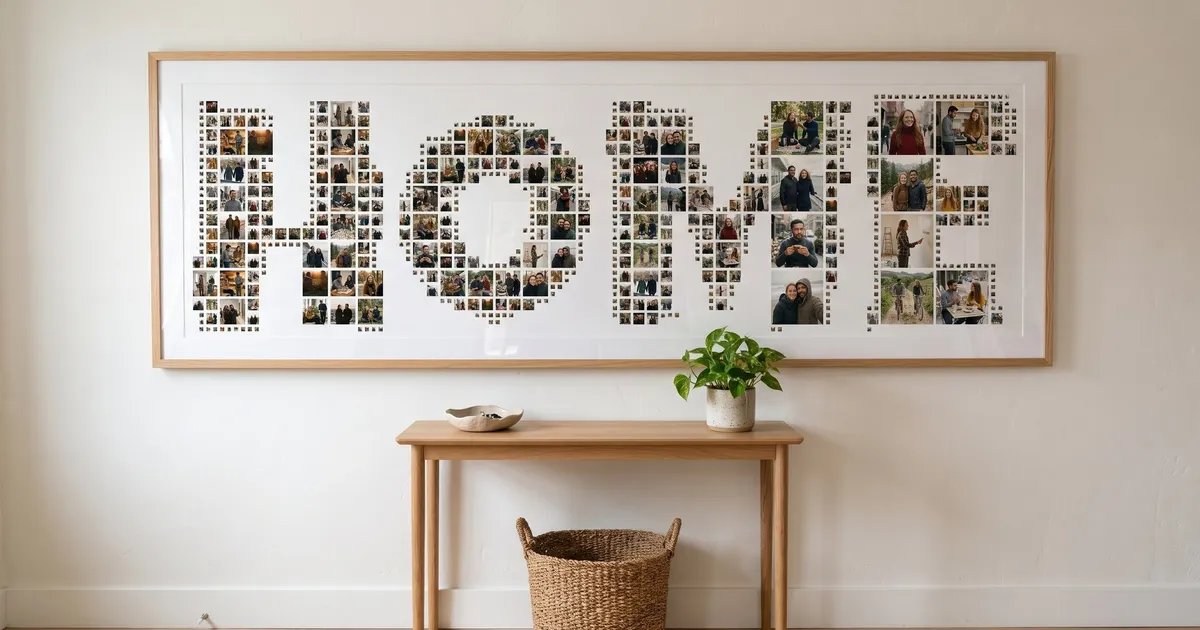
Short words that name a place or a person work well on a wall: HOME, MUM, a street name, a team name. The cover photo is HOME above an entryway console.
A name
A first name is the classic gift. SARA is four letters, so the strokes stay thick.
Printed and framed, it fits above a desk.

Initials
Two initials with an ampersand stay short and bold, and they suit couples and anniversaries. S&A below is three characters.

Our anniversary photo collage guide has more ideas for initials and numbers together.
A year
A birth year, a graduation year or the coming year. Digits behave like letters in the Text tool, and our number collage guide has more ideas for ages and years.

A year also makes a good centrepiece for a vision board.
A single letter
One letter gives the photos the most room. It suits a child’s room, a monogram or a shelf.

Accents and letters outside the Latin alphabet depend on the font, and we have not checked which characters each font can draw. Type your text and look at the result before you export.
How many photos does a word need?
There is no fixed number. The letters have a certain number of spots, and that number depends on the text, the font and the settings.
- Fewer photos than spots: photos repeat until every spot is filled.
- More photos than spots: the extra photos get no spot and do not appear. Lower Size of photos or raise Accuracy level to create more spots.
Our examples used about 40 photos for words of three or four characters. As a start, 30 to 60 photos is a comfortable range for 3 to 5 characters. Repeats are fine: the same photo can appear in several spots. If you have hundreds, our 100 photo collage guide shows how a big set behaves in a shape.
How long can the text be?
The text is always set on one line. Phinsh scales that line to fit the width of the collage, so the more characters you type, the thinner each letter becomes.
| What you type | What you get |
|---|---|
| One character (A) | One large, thick letter with room for many photos |
| 3 to 5 characters (HOME, SARA, S&A) | Thick letters, photos stay recognisable |
| A long name or a sentence | A very wide, thin strip with small photos |
There is no line break and no multi-line layout. For a long name, use a nickname, the initials or one key word. For two names, use initials like S&A.
Which font to pick
Thick, heavy fonts hold photos best. Thin or script fonts leave little room for photos. In the Text Shape panel each font button shows the word Phinsh in that font, so you can choose by look. Tapping a font rebuilds the collage, so you can try several.
Our examples use Luckiest Guy, a heavy rounded font, for HOME, SARA, S&A and the letter A, and Varsity Team, a blocky athletic font, for 2027.
Adjust settings for short and long words
Open Adjust to change the three sliders: Size of photos, Space between photos and Accuracy level. A new text collage starts at 42, 13 and 3. Our examples used different values, which you can use as a starting point.
| Example | Size of photos | Space between photos | Accuracy level |
|---|---|---|---|
| HOME, SARA, S&A | 65 | 16 | 4 |
| The year 2027 | 80 | 18 | 3 |
| The letter A | 70 | 20 | 3 |
These are tips from our own renders, not rules.
- Size of photos. A larger value gives fewer, bigger photos. Short words can take larger photos because each stroke is wide.
- Space between photos. More space gives clean gaps between photos, less space gives a denser mosaic.
- Accuracy level. Higher values add smaller photos along the edge of the letters, so the outline is followed more closely. In our examples HOME, SARA and S&A used 4.

Add a line of text or a sticker
The Text tool under Shape makes the collage itself out of letters. The separate Text button on the toolbar adds a movable line of text on top of the finished collage, for example a date under the name. The Sticker button adds emoji and graphic stickers you can drag, resize and rotate. One short line and a sticker or two is enough, because more starts to cover the photos.
How to make a text collage in Phinsh
- Add your photos. On a phone, tap START and choose them. In the browser, click Add Photos and then the check mark.
- Tap Shape, then Text, and type your word in the field “Input text here”.
- Tap the orange send arrow or a font in the Fonts list. The collage takes the shape of the word. Try a few fonts.
- Open Adjust and move the three sliders (see the table above). Open Layout and choose Collage, so the saved image has no empty margin around a wide word.
- Tap the download icon, choose a size and tap Export.

Phinsh makes the image file. Shuffle in the toolbar rearranges the photos if one spot shows a photo you do not like, and Edit Photos lets you swap two.
Print a word collage
The export size is the longest side of the image, and for a wide word that is the width. Phones export up to 6000px, and the web app up to 12000px. Standard (1500px) suits screens and sharing. Ultra High (6000px) is the size the app describes as best for large prints or a framed picture, and Super UHD (12000px) is offered in the web app.
The table shows the longest side printed at 300 pixels per inch. These sizes are our own arithmetic.
| Export size | Longest side printed at 300 ppi |
|---|---|
| 3000px | about 25 cm (10 in) |
| 6000px | about 50 cm (20 in) |
| 12000px, web only | about 100 cm (40 in) |
A wide word like HOME is that wide and about a third as tall. Phinsh does not print or ship, so take the file to a print service. Use a wide white mat in the frame, so the letters have space around them. For other shapes besides letters, see shape photo collage art.
Frequently asked questions
What is a text collage?
A text collage is a word, name, initials or year whose letters are filled with small photos. From a distance you read the word, and up close you see the pictures. It is different from a word cloud, which is made of words rather than photos.
Can collages have text?
Yes, in two ways. In Phinsh, Shape and then Text turns your words into the collage shape, so the photos sit inside the letters. The Text button on the toolbar adds a movable line of text on top of any collage, for example a date.
How many photos do I need for a name collage?
About 40 photos filled the four-letter examples on this page, and 30 to 60 is a comfortable range for 3 to 5 characters. If you add fewer photos than the letters have spots, photos repeat. If you add more, the extra photos get no spot and do not appear.
Can I write a whole sentence or a long name?
You can type it, but the text is set on one line with no line break, so a long text becomes a very wide, thin shape with small photos. Use a nickname, initials or one key word instead.
Can I make a text collage on my phone?
Yes. Phinsh runs on Android and iPhone, and in a browser at phinsh.com/app. On a phone the store app is the stable choice, because the web app warns that it can be unstable on mobile browsers.